Sandboxing coding agents
- 原文链接: https://micahflee.com/sandboxing-coding-agents/
- 作者: Micah Lee
- 日期: 2026-08-27
- 分类: coding
- 来源类型: article
- 标签: sandboxing, agent-security, docker, ssh, commit-signing, howto
- 质量评分: 4/5
- 抓取时间: 2026-08-28T23:55:00+08:00
中文导读
Micah Lee 公开把 coding agent 关进 Docker Sandboxes 的完整脚本:先给 agent 生成专用 ed25519 SSH key,在 GitHub 上只加为 signing key(绝不能加为 authentication key,否则 agent 能触达你账号能访问的所有仓库);再用 shell 脚本启动隔离 ssh-agent,只 load 这把 key 并转发进 sandbox;最后用 sbx daemon 起 sandbox。设计效果:agent 在 sandbox 里能 sign commit(commit 历史保持可验证、AI 参与透明化),但拿不到 host 上其它 SSH key 能访问的仓库。配套 stop-isolated-ssh 收尾脚本。与 Simon Willison 的结论性呼吁相比,这是可以原样抄的实现,作者刚在 DEF CON AI Village 打完 HalCTF,思路经过实战检验。
为什么值得关注
与同日 Simon Willison 的沙箱呼吁互为印证与补充:一个给结论,一个给可执行脚本,直接落地 agent 安全基线。
原文(抓取存档·节选)
# Sandboxing coding agents
> 发布时间: 2026-08-27T19:58:21.000Z
> 原文链接: https://micahflee.com/sandboxing-coding-agents/

---

At the beginning of the month I [wrote](https://micahflee.com/agentic-coding-techniques/) about how I've been using coding agents to write high quality code securely. In this post I'll show the details of setting up isolated sandboxes for agents, where they can only access a single isolated GitHub repo, and where they sign commits with a dedicated agent-only key.

## Create the agent signing key

I'm increasingly of the opinion that everyone should be transparent about their AI use, and this includes agentic coding. Because of this, I think it makes sense for commits made by LLMs to 1) use an author name that makes it clear it's not a human, and 2) sign the commit with an SSH key that's only used by agents.

To get started, generate a new SSH key, and save it as `~/.ssh/agent-signing-key`:
ssh-keygen -t ed25519
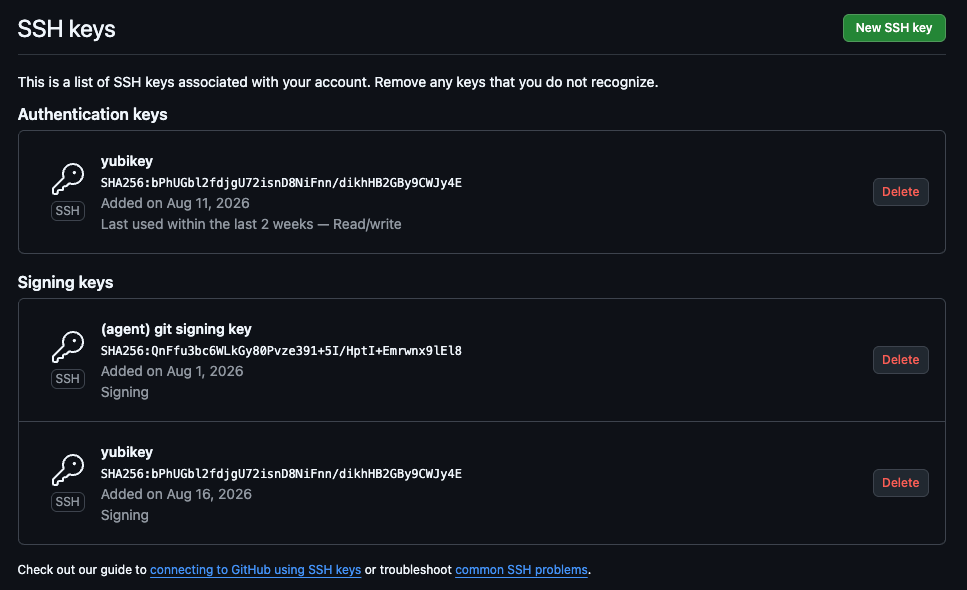
Next, go to your GitHub account settings and edit your SSH keys. You can define which SSH public keys are included in your GitHub account, and which are for _authentication_ (being able to git clone with SSH git URLs), and _signing_ (being listed as "verified" when you use it to sign a commit).

Add your agent's new public key as a _signing key_. Make sure it's not an authentication key. Otherwise, the agent will be able to access all of the repos your GitHub account can access.

## Script for creating an isolated SSH agent

I use [Docker Sandboxes](https://docs.docker.com/ai/sandboxes/) as my sandbox technology. Docker Sandboxes supports forwarding your host SSH agent into the sandbox so that it can sign commits with your SSH key.

However, I don't want to forward my normal SSH agent into the sandbox, because then the agent running in the sandbox will have access to my SSH key, and by extension everything that my SSH key can access. So instead, I wrote a little script that creates an isolated SSH agent, and only loads the agent's SSH key into it.
!/bin/sh
SIGNING_KEY="${HOME}/.ssh/agent-signing-key"
The full `start-isolated-ssh.sh` script and the matching `stop-isolated-ssh` cleanup script are in the original post. The design guarantees the agent inside the sandbox can sign commits (keeping your commit history verifiable) but cannot reach any of the other repositories your host SSH keys can access.

After playing HalCTF in the AI Village at DEF CON this month, these techniques have been battle-tested.